In an era where data privacy is paramount, knowing how to redact PDF document information correctly is a critical skill. Whether you are a lawyer handling case files, a HR manager processing contracts, or just someone looking to hide their address on a bank statement, improper redaction can lead to disastrous data leaks.
This comprehensive guide will teach you everything you need to know about hiding sensitive text. We will explore why simply drawing a black box is not enough, and how to use our free online tool to permanently Sanitize your files.
1. What Does "Redact PDF Document" Actually Mean?
To redact PDF document data means to permanently remove visible text and graphics from a document. The word "redaction" comes from the Latin redigere, meaning "to bring back" or "to reduce" — effectively reducing the document to only the information that is meant to be seen.
Unlike simply highlighting text in black, true redaction removes the underlying code that represents the characters. If you use a tool that only adds a black layer, a savvy user can simply "select all," copy the text, and paste it elsewhere to reveal your secrets. Our tool ensures this doesn't happen.
2. The "Black Box" Mistake: Why You Are Doing It Wrong
Many users try to redact PDF document files using standard image editors or basic PDF viewers. Here is why that fails:
- The Overlay Problem: Drawing a black rectangle over text hides it visually, but the text layer remains underneath. Search engines and screen readers can still read it.
- Metadata Leaks: Even if the text is gone, the document's metadata (author name, creation history) might still reveal sensitive info.
- Undo History: Some editors save an "undo" history that allows the recipient to simply revert the changes.
Warning: Never use a simple "highlighter" tool set to black color. Always use a dedicated redaction tool.
3. Step-by-Step: How to Redact PDF Document Online
Using our Free Redact Tool is the safest way to sanitize your files. Follow these simple steps:
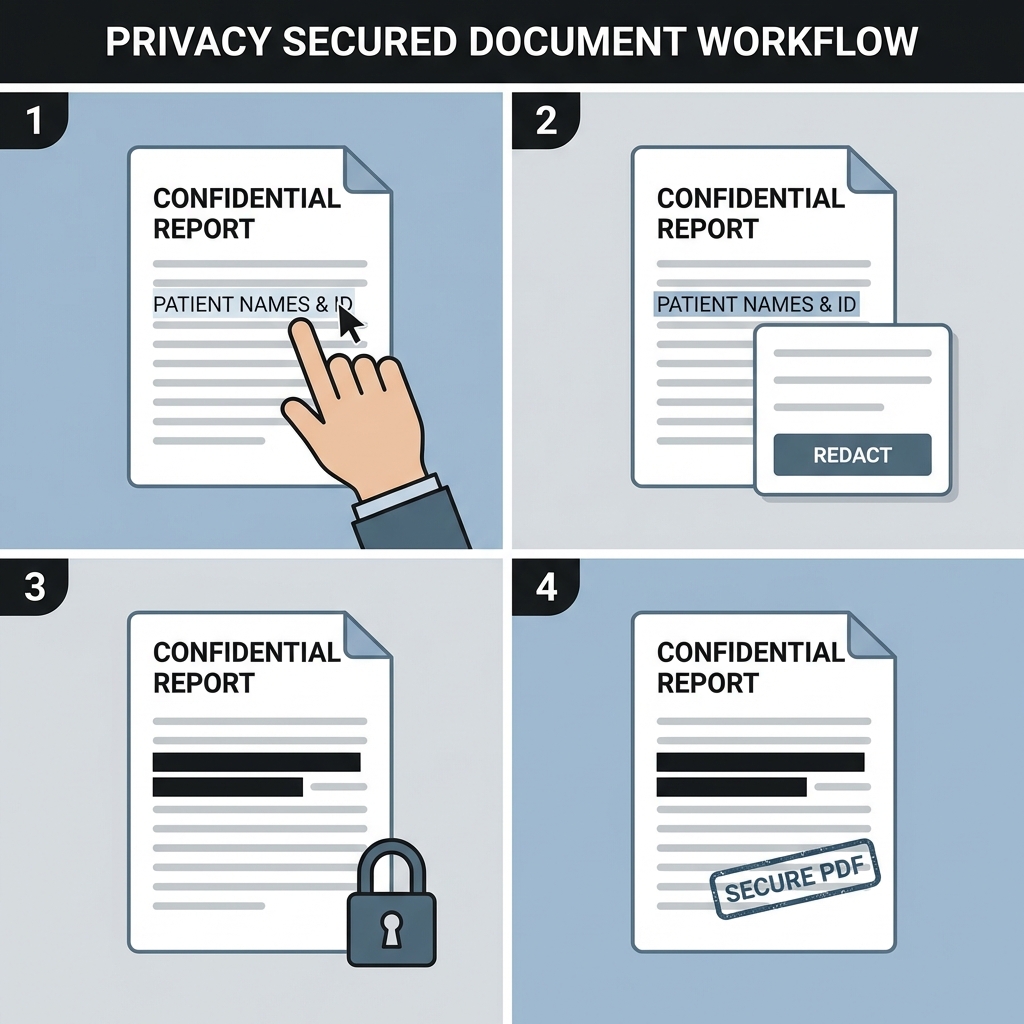
- Upload Your File: Select the file you want to sanitize. Since we use client-side technology, your file never leaves your computer.
- Select Text or Areas: Use our "Draw" tool to create boxes over the sensitive areas. You will see a red transparent box initially.
- Verify Coverage: Ensure the box covers the entire sentence or image you wish to hide.
- Apply Redaction: Click "Apply". The tool will now burn the black pixels into the document and strip the text underneath.
- Download: Get your completely sanitized file.
4. Why Client-Side Redaction is Safest
When you look for tools to redact PDF document online, you will find many websites asking you to upload your file to their server. This is a massive security risk for:
- Legal Contracts: Do you want a random server storing your NDAs?
- Medical Records: Uploading patient data is a HIPAA violation.
- Financial Data: Bank statements should never leave your device.
Our tool runs 100% in your browser. The code travels to your computer, but your PDF file never travels to us. It is the digital equivalent of redaction in a locked room.
5. When Should You Redact?
You should redact PDF document information whenever you are sharing files publicly or with untrusted parties. Common scenarios include:
Legal Proceedings
Lawyers constantly redact names of minors, victims, or unrelated witnesses from court filings.
Government & FOIA
When releasing government documents under the Freedom of Information Act, sensitive national security data must be redacted.
Personal Finance
Applying to rent an apartment? You usually need to provide bank statements. Always redact your Account Number and Routing Number before emailing them.
6. GDPR, HIPAA, and Legal Compliance
For businesses in Europe, the GDPR (General Data Protection Regulation) mandates strict control over personal data. If you share a PDF containing a customer's email address or phone number, you might be liable for a fine.
Correctly using a tool to redact PDF document data allows you to share the necessary business information (like transaction totals) without exposing Personal Identifiable Information (PII). This is crucial for maintaining compliance and trust.
7. Frequently Asked Questions
Is the black box permanent?
Yes. When you use our tool, we flatten the document layers. The black box becomes part of the base image, and the text underneath is destroyed.
Can I un-redact the file later?
No. Once you save the redacted file, the information is gone forever. We recommend keeping a copy of the original "Clean" file for your own records.
Is it free?
Yes, our tool to redact PDF document is completely free with no daily limits.
Conclusion
Privacy is not optional. Whether for legal compliance or personal security, knowing how to properly redact PDF document files is essential. Don't rely on cheap tricks or uncertain software.
Use our professional, secure, and client-side Online Redaction Tool today and ensure your secrets stay secret.
Related Tools: Merge PDF, Compress PDF.
Short URL: ezpdf.com/redact (Example)