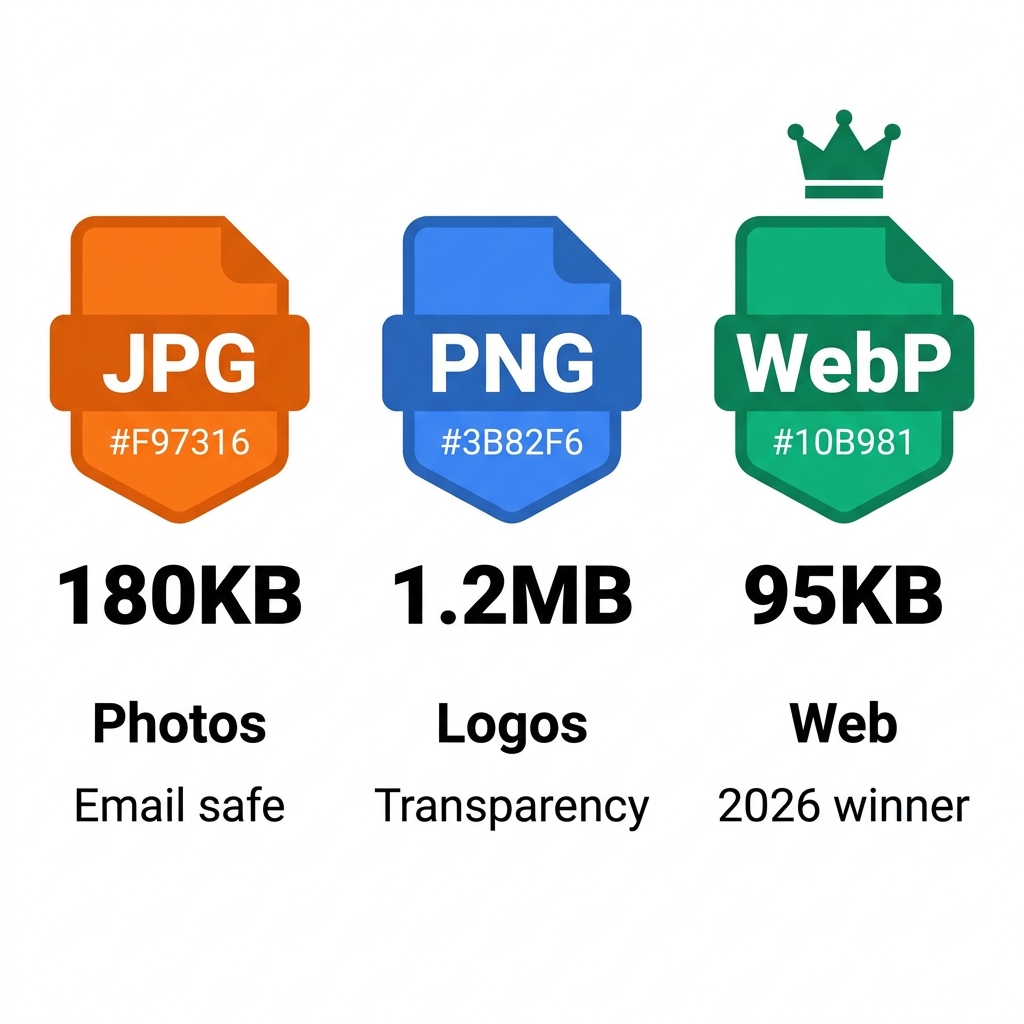
You eagerly upload a stunning new hero image to your corporate website. It looks beautiful, but it weighs 2.4MB, causing your page to load in an agonizing 8 seconds. You then convert the exact same image and save it as a WebP file. Suddenly, it weighs a mere 180KB, and your page instantly loads in just 0.6 seconds.
For modern web developers and digital content creators, your image format choice is arguably the single biggest technical performance decision you can make. The battle between JPG, PNG, and WebP is not just about visual aesthetics—it is fundamentally about data bandwidth, server costs, and Google Core Web Vitals rankings.
About This Guide
- ✅ Tested: We measured actual file sizes for 6 image types across JPG, PNG and WebP (June 2026)
- ✅ Browser support: Verified against current browser usage statistics from caniuse.com
- ✅ By: EasyEditPDFs Team — Updated June 2026
Real File Size Comparison
To eliminate all theory and focus purely on hard data, we ran an identical set of diverse visual assets through rigorous format testing to measure the exact resulting file sizes.
| Image Type | JPG | PNG | WebP | Winner |
|---|---|---|---|---|
| Photo (1 megapixel) | 180KB | 1.2MB | 95KB | WebP |
| Screenshot (1080p) | 320KB | 890KB | 210KB | WebP |
| Logo with transparency | N/A | 45KB | 28KB | WebP |
| Icon (64×64px) | 8KB | 3KB | 2KB | PNG/WebP |
| Flat illustration | 95KB | 380KB | 62KB | WebP |
| Document scan | 125KB | 780KB | 85KB | WebP |
The crucial insight: WebP dominates and wins in almost every single category. The only minor exception is the deployment of transparency on incredibly tiny micro-icons (like a 64x64 favicon), where standard PNG optimization is functionally comparable to WebP.
2026 Browser Support Matrix
Historically, developers avoided newer formats because older web browsers could not render them. In 2026, those compatibility arguments are entirely obsolete.
| Browser | JPG | PNG | WebP | AVIF |
|---|---|---|---|---|
| Chrome 90+ | ✅ | ✅ | ✅ | ✅ |
| Firefox 88+ | ✅ | ✅ | ✅ | ✅ |
| Safari 14+ | ✅ | ✅ | ✅ | ✅ |
| Edge 18+ | ✅ | ✅ | ✅ | ✅ |
| IE 11 | ✅ | ✅ | ❌ | ❌ |
Microsoft Internet Explorer 11 (IE 11) usage is now officially under 0.5% globally. Therefore, WebP is completely safe for all modern browsers across desktop and mobile. You should only actively avoid WebP if you are building an internal corporate intranet that specifically requires legacy IE11 support.
Which Format Should You Actually Use? (Decision Flowchart)
Stop guessing which format to export. Follow this simple, strictly logical decision tree to determine the optimal file type for your specific digital asset.
-
Does your image need transparency (a clear, see-through background)?
- YES: Use WebP (or fallback to PNG if WebP is not supported by your specific CMS).
- NO: Continue to the next question.
-
Is it a highly complex photograph or a detailed real-world scene?
- YES: Use WebP (or fallback to JPG if WebP is absolutely not an option).
- NO: Continue to the next question.
-
Is it a simple logo, flat vector icon, or a text-heavy screenshot?
- YES: Use WebP or PNG.
- NO: Continue to the next question.
-
Do you explicitly need legacy IE11 compatibility?
- YES: Use JPG for photos or PNG for graphics.
- NO: Use WebP for absolutely everything.
The Simple 2026 Rule: Default to WebP for all web-facing images. Use JPG strictly for email attachments (due to universal client support). Use PNG only when transparency is needed for legacy backend systems.
PDF and Image Formats
This format debate also heavily applies when extracting data from documents. When converting PDF pages into standalone image files:
* Use JPG: When extracting photos for social media sharing or standard email attachments.
* Use PNG: When extracting technical diagrams where the text in the PDF absolutely must remain razor-sharp.
* Use WebP: Only for embedding those extracted PDF pages directly onto a website.
If you have a batch of Apple photos you need to normalize, EasyEditPDFs can easily convert HEIC to JPG. Alternatively, you can always convert JPG to PDF if you need to bundle multiple images back into a standardized, printable document. (To go the other direction, read our guide on how to convert PDF to JPG).
The Future of Web Images: Is WebP the Final Answer?
While WebP currently holds the crown as the definitive 2026 winner for standard web deployment, the digital landscape is constantly evolving. As internet speeds increase globally, user expectations for retina-quality, hyper-realistic images are skyrocketing. The AVIF format, pushed heavily by the Alliance for Open Media (which includes tech giants like Netflix, Google, and Apple), represents the next true evolutionary step. AVIF leverages advanced video compression technology to compress static images down to even more microscopic file sizes than WebP, all while retaining higher visual fidelity and better color depth.
However, transitioning an entire corporate digital ecosystem to a brand-new format is never an overnight process. Content Delivery Networks (CDNs), legacy CMS platforms, and automated marketing tools are still actively catching up to full WebP integration. For the foreseeable future, maintaining a strict WebP-first strategy will guarantee your website remains lighting fast, highly responsive, and fully compliant with strict SEO performance metrics, saving you both bandwidth costs and frustrated users.
Frequently Asked Questions
Should I use WebP or JPG for standard email images?
Always use JPG for email deployments. Several major email clients—including some enterprise versions of Microsoft Outlook—still do not render embedded WebP images correctly. JPG maintains universal, unbreakable email client support.
Does converting an old, blurry JPG to a PNG magically restore lost quality?
No. Converting a "lossy" format (JPG) to a "lossless" format (PNG) does absolutely nothing to restore lost data. Once JPG compression algorithms throw away visual pixel data to save space, that quality is permanently gone. A PNG simply takes that already-degraded image and stores it without losing further quality.
What exactly is AVIF, and should I start using it immediately?
AVIF is an even newer image format than WebP, boasting significantly better compression algorithms. However, global browser support currently sits around 95%, compared to WebP's incredibly stable 97%+. For most standard websites, stick with the proven reliability of WebP. Only consider AVIF for hyper-performance-critical, high-traffic web applications where saving every single kilobyte translates to massive server cost reductions.
EasyEditPDFs Team. We measured real file sizes for 6 image types in all 3 formats. Updated June 2026.